

Avoid 6 Common Mistakes Preparing for Usability Testing

9 Essential Participant Recruitment Questions (And Answers) for UX Teams
Participant recruitment is one of the most important parts of running user research. Whether you’re testing a new feature, validating a design, or simply trying to understand your users better, your insights are only as strong as the people you speak to.
We get a lot of questions about participant recruitment, especially from teams across Southeast Asia, where local context adds another layer of complexity. So in this guide, we’re tackling the most common questions we’ve heard over the years, with practical, real-world answers to help you plan smarter, recruit better, and avoid costly missteps—whether it’s your first study or your fiftieth.
In this Article
1. How Many Participants/Respondents Is Enough?
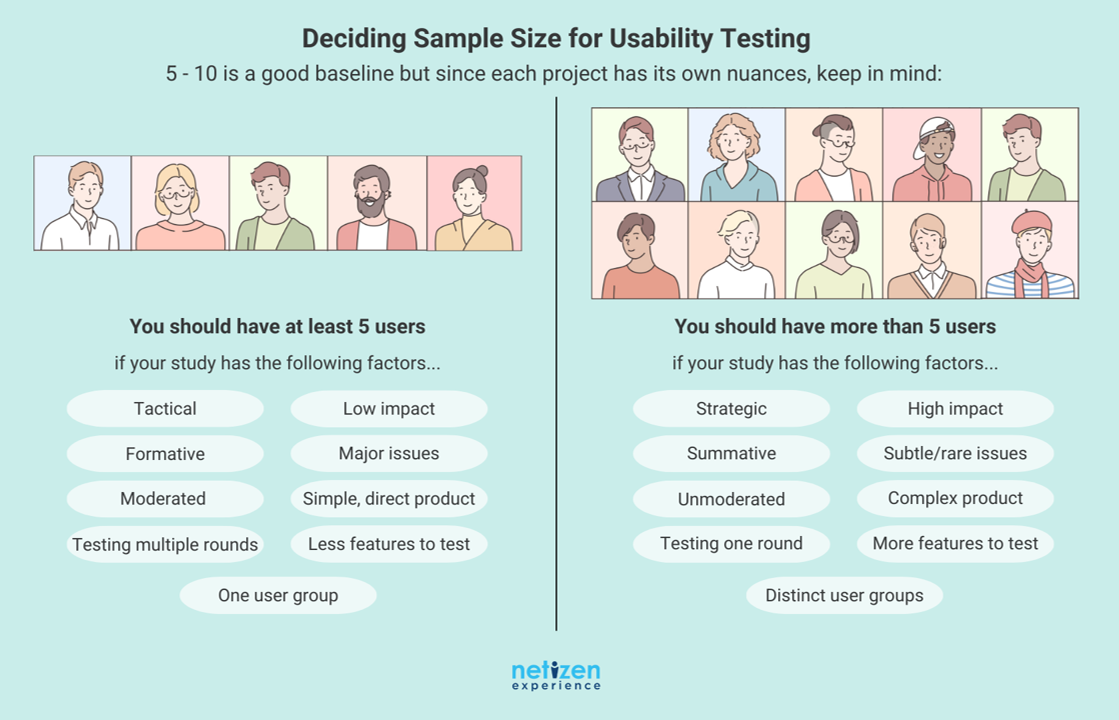
This is hands down the most common question we get—and usually the very first one too. And the honest answer? It depends. The number of participants you need really comes down to the purpose of your study.
If you’re in the discovery phase, looking to explore user behaviours and mental models, a small number of in-depth conversations might be exactly what you need. On the other hand, if you’re testing a design that’s already been through a few rounds of refinement, your focus might be on validation so you’d recruit just enough users to catch major usability issues quickly.
For example, if you’re running a quick usability test to uncover friction points, around 5–10 participants can go a long way. But if you’re conducting a quantitative survey and aiming for statistically meaningful results, you’ll want at least 60 respondents—and ideally 150 or more, if your goal is deeper confidence in the data.
Of course, there are other factors at play too. Budget is a big one. And sometimes, it’s more effective to run your sessions in stages—test with a few people, make improvements, and test again—rather than go all in at once.
It’s not always a straightforward answer, which is why we’ve written a separate article that dives deeper into this very topic. If you’re still wondering what number is “just right” for your study, the article is a good read. Alternatively, check out this handy infographic to figure out what number of participants is best for you:
2. Do We Really Need to Offer Incentives—and What Kind Works Best?
Yes, absolutely. Incentives should always be part of your participant recruitment strategy and not just as a “nice to have,” but as a meaningful way to reward people for their time and effort. Whether they’re setting aside an hour in their busy day or making the trip to join your session, an incentive adds value and shows you respect their contribution.
When it comes to what kind of incentive to offer, the rule of thumb is: keep it simple and usable. Cash is king. It’s fuss-free, universally appreciated, and easy to understand. People tend to appreciate something they can use right away, with as little restriction as possible. If cash isn’t feasible (say, due to company policy), alternatives like e-wallet reloads, gift cards, or digital vouchers also work well, just make sure they’re practical and accessible to your participants.
So how much should you offer? That depends on who you’re recruiting. If you’re working with a recruitment agency, they can usually advise you on the market rate based on your target profile. But if you’re handling recruitment yourself, consider the background of your participants. Higher earners—like doctors or executives—typically expect a more substantial incentive compared to, say, students or entry-level employees.
Also, if participants need to travel a considerable distance to attend, it’s thoughtful to provide separate travel reimbursement to make their journey easier.
The bottom line: an incentive is more than just a payment—it’s a way of saying, “Your time matters.” And when done right, it makes a big difference in both turnout and the quality of your sessions.
3. Should We Engage a Participant Recruitment Agency or Specialist?
The short answer? It depends on what kind of participants you need—and what you’re realistically able to handle on your own.
If you already have a list of users or customers to recruit from, you might be able to take care of it yourself. But participant recruitment isn’t always that straightforward. Maybe you’re thinking of reaching out to friends or family who are willing to help out. That’s fine—if they happen to match your recruitment criteria. But more often than not, they don’t. And if they don’t represent your actual users, the insights you get from them may not be useful, or worse, may lead you in the wrong direction.
That’s where a recruitment agency comes in.
If you don’t have the right pool to recruit from, or you’re short on time and resources, working with a participant recruitment agency or specialist can make a big difference. This is what they do every day. They’ll help define your criteria, prepare screeners, find the right people, make the calls, manage scheduling, send reminders, and most importantly, make sure the participants actually show up.
So ask yourself: Do I have the right people, tools, and time to recruit effectively on my own? If not, it’s probably worth handing it over to the experts.
4. Are All Participant Recruitment Agencies The Same?
So let’s say you’ve decided to enlist an agency to help with recruitment. The next question that naturally comes up is: which one should I go for? And more importantly—aren’t they all the same?
The short answer: no, they’re definitely not.
Every recruitment agency or specialist brings something different to the table. Some have access to massive respondent panels, sometimes with millions of people across different countries—which can be great if you’re running large-scale or international surveys. But if you’re after something more specific—say, orthopedic specialists, fintech early adopters, or even caregivers for stroke patients—those people are much harder to find.
That’s where niche agencies come in. Some agencies specialize in hard-to-find participants, and while they may not have sheer volume, they shine in sourcing very specific user profiles. Naturally, the rarer the profile, the higher the cost—but it’s a cost that reflects the effort, quality, and relevance of the respondents you’ll get.
So, when choosing a recruitment partner, think about who you’re trying to reach. Because the right agency for a broad consumer survey may not be the right fit if you need a very targeted or specialized audience.
5. If We Can Recruit Customers, What Channels Should We Use?
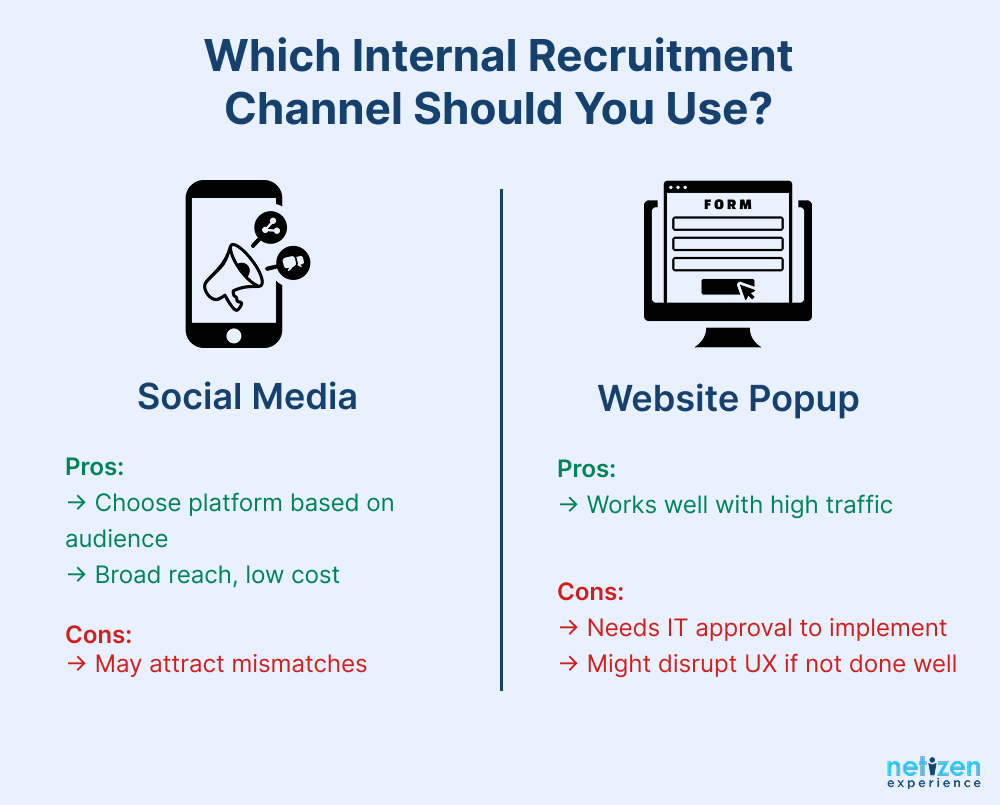
Let’s say we want to go the route of internal recruitment instead of hiring an agency. The two most common channels we usually consider are: website pop-ups and recruitment via social media. Both have their place so it really comes down to how you want to reach your users and which channel your target participants are most active in.
Using pop-ups on your website can work well, but there are a few things to think through. First, you’ll need approval to implement it and likely some support from your IT team. That alone can be a blocker. Then there’s the question of user experience where pop-ups run the risk of disrupting the visitor’s journey. You’ll need to ask:
-
- Where should it appear?
- Will it annoy or interrupt the visitor?
- And if it does, is that trade-off worth it, or would an email or a softer CTA make more sense?
If done right, website pop-ups can be a useful recruitment method—but only if the traffic volume and user mindset are a good fit.
Then there’s social media—a channel that’s popular everywhere, especially across Asia. Whether it’s Facebook, Instagram, LinkedIn, or even TikTok, people are online and scrolling. This makes social media a great option for quick, cost-effective recruitment, particularly for surveys or broad outreach. That said, success depends heavily on having a clear strategy and choosing the right platform for your audience. If you’re targeting professionals, LinkedIn might be ideal. For younger users, Instagram or TikTok could be the way to go. Just be mindful that casting a wide net can also lead to disappointment if users express interest but aren’t selected.
In the end, it’s about knowing where your users are and how best to reach them, then making sure the invitation feels relevant, respectful, and worth their time.
6. How Do We Recruit the Right People—And Avoid the Wrong Ones?
Recruiting the right participants starts with a solid workflow—and if you’re new to this, don’t worry, it’s more manageable than it sounds.
Begin by defining clear participant recruitment criteria. Who exactly are you trying to reach? Be specific about traits like age, occupation, experience level, or even how they use a certain product or service. Once you’ve got that, the next step is to build a screener—a set of questions designed to filter out the participants who truly match your target audience.
As an extra precaution (and one we strongly recommend, especially for niche profiles), you can also call participants to verify their answers before confirming them. Some teams even reconfirm this at the start of the session with a few key questions, just to be safe.
Now, let’s talk about something that isn’t always discussed: “professional participants.” These are people who sign up for as many studies as possible—sometimes pretending to be someone they’re not just to qualify for the incentive. Unfortunately, it’s more common than you might think. In fact, there are even online guides created by these participants, openly sharing tips on how to trick screeners, change answers across platforms, and maximize invitations by faking their profile.
That’s why proper screening and validation is so important. To protect your study, make it clear from the start that false information or misrepresentation will disqualify them from receiving the incentive. It might seem like a small step, but being upfront helps deter dishonest signups and sets the tone for a more reliable session.
So while most participants are genuinely interested and trustworthy, it’s still crucial to put the right steps in place. A well-thought-out screener, clear criteria, and a bit of verification go a long way toward ensuring you’re hearing from the right people—not just the most persistent ones.
7. Do Participants Need to Be Active Users of the Product?
Not necessarily. Whether you need active users—or not—really depends on the context of your study.
If you’re looking to better understand your current customer base or test a new feature, then yes—recruiting active users makes sense. You’ll want people who are familiar with your product and have been using it regularly enough to give informed feedback.
But if you’re trying to uncover pain points, or understand why people stopped using your product, inactive users can actually give you the most valuable insights. They can help you see what went wrong, where expectations weren’t met, or what might have driven them to switch to a competitor.
So, don’t limit yourself only to active users—think about what you’re trying to learn. The right participants are the ones who can speak to the specific questions you’re trying to answer.
8. Should Survey Respondents/Research Participants Be Trained?
Let’s start by clarifying what we mean by training participants. It’s not about teaching them the topic or guiding their opinions, it’s simply about making sure they know what to expect and what to do during the session. Think of it as helping participants feel prepared so that the session runs smoothly, whether that’s knowing how to join a remote call, how to think aloud during usability testing, or understanding what their role is in the discussion.
While it’s not the norm to formally train participants, some participant recruitment agencies do provide light orientation ahead of time. It’s a way to ensure smoother sessions with fewer awkward silences, fewer technical hiccups (especially for remote testing), and participants who are more comfortable sharing feedback. This kind of prep doesn’t influence their responses, instead it helps them show up ready to participate fully.
That said, it’s more common not to train participants at all. Most researchers rely on a clear introduction and simple instructions at the start of the session. And for qualitative research like in-depth interviews or usability testing, it’s often the facilitator’s job to guide the participant—encouraging them to speak up, think aloud, or elaborate when needed.
Just keep in mind: adding even a basic pre-session briefing or checklist can slightly extend your recruitment workflow—but it may significantly improve the quality of feedback you get.
9. Should We Have Backup Respondents/Participants?
Yes, without a doubt. Having backup participants is one of those small precautions that can save you a lot of stress, especially when things don’t go as planned (which, let’s face it, happens more often than we’d like).
In Southeast Asia—particularly in Malaysia, Singapore, Indonesia, the Philippines, Thailand, and Vietnam—we’ve seen time and again that attendance rates are rarely 100%. Even if you’ve confirmed all 15 participants, something can still go wrong. Maybe someone falls sick, gets stuck in traffic, or simply forgets their session. Suddenly, you’re scrambling to find a last-minute replacement. That takes time, pushes the research timeline back, delays analysis, and often adds more cost to the project.
But if you have backup respondents ready to go, they can easily step in. No delay, no added hassle. It’s a simple safeguard, but one that can make a big difference in keeping your research (and your team’s sanity) on track.
That said, managing backup participants thoughtfully is just as important. Here are a few best practices we’ve found helpful:
- Be transparent. Let them know upfront that they’re being recruited as backup participants.
- Respect their time. Even if they don’t end up participating, it’s good practice to compensate them for blocking their schedule. If the main incentive is on the lower side, we recommend giving them the full amount. If the incentive is higher, offering half is a fair gesture—and still encourages them to keep the slot open.
- Plan your backup day. Build in a buffer by scheduling your backup participants on the last day of your testing window. This gives you time to monitor attendance and inform them in advance whether their session will proceed or not.
It may feel like extra coordination at first, but it’s worth it. A smooth, well-prepared backup plan gives you breathing room and keeps the entire research process moving forward, even when the unexpected happens.
Final Thoughts
Participant recruitment isn’t just about filling slots—it’s about making sure the right voices are in the room (or on the call) when it matters most. From deciding how many people to recruit, to offering incentives, avoiding no-shows, or choosing between DIY and agency support, every step shapes the quality of your insights. While there’s no one-size-fits-all approach, having a clear process—and a few smart precautions—can make a huge difference.
We hope this guide has helped answer some of your biggest recruitment questions (and maybe a few you didn’t think to ask). If you’d like a hand with your next qualitative or quantitative study, our team is here to help. Reach out to us at support@netizenexperience.com or visit www.netizenexperience.com—we’re always happy to help you find the right participants to make your research count.

User Acceptance Testing (UAT) And 10 Best Practices
For the most part, UAT or user acceptance testing is considered a quality assurance step that ensures that all the buttons, visual elements, and attributes work, and there are no technical bugs in the software.
The main purpose of UAT is to check the software against the business requirements. The ‘user’ in this context is usually referring to the business user or client or person who is familiar with the business requirement.
It is also common for business users to invest in a specialist testing team to help them conduct the UAT and present the UAT result to them to see if it is in accordance with their expectations for acceptance.
As a matter of fact, it differs from usability testing in that a piece of software can pass all UAT tests but still demonstrate poor usability.
What is User Acceptance Testing (UAT)?
Generally speaking, User Acceptance Testing (UAT) is where a website or mobile application is iteratively checked to ascertain if it performs the functions it was set out to conduct, according to defined expectations.
That being said, UAT is typically the last phase of the software testing process before rollout and involves actual software users testing the software to ensure it can handle required tasks in real-world scenarios, according to defined specifications.
What is the objective of User Acceptance Testing (UAT)?
The primary goal of User Acceptance Tests is to validate that software does what it was supposed to do. However, to achieve this, all functional requirements are typically extensively checked, and use cases are covered while dealing with real scenarios and real data.
So, UAT tests generally revolve around verifying that a system’s behaviour is consistent with its specified requirements to reveal defects within the system. The UAT process begins after acceptance requirements are written and continues through the final stage of testing.
Overall, UAT testing is based on three elements:
- Business requirements
- Business processes
- User expectations
What is the scope of UAT?
Most UAT operations focus on ensuring that data capture, data processing, data distribution and data archiving activities on a website are fully operational.
They also ensure all business functions are performed, as per prescribed business rules, and that all business systems connected to the software system in UAT, pass and receive data or control as defined in the requirements specification.
Levels of user acceptance testing
- Unit testing
- Integration testing
- System testing
- Acceptance testing or UAT.
Types of user acceptance testing techniques
The main types of User Acceptance Testing methods are:
- Alpha & Beta Testing
- Black Box Testing
- Contract Acceptance Testing
- Regulation Acceptance Testing
- Operational Acceptance Testing
What are the key deliverables in user acceptance testing?
The key deliverables of the UAT phase are:
- Test Plan: This mainly outlines the Testing Strategy
- UAT Test cases: The Test cases help the team effectively test the application in the UAT environment.
- Test Results and Error Reports: This is essentially a log of all the test cases executed and the actual results.
- Installation Instructions: This document helps to install the system in a production environment.
- UAT Sign-off: This ensures that the system, documentation, and training materials have passed all tests within defined acceptable margins.
- Documentation Materials: Here, tested and updated user documentation and training materials are finalised during UAT.
Stages at which user acceptance testing is performed
UAT is mainly performed at two stages:
- Sequential development: This stage employs a sequence of development stages that usually follow a V-shape. UAT is the final test level that tests the completed system with respect to the business requirements.
- Iterative Development: This approach entails the design and testing occurring during short sprints. As a result, the system functionality becomes available incrementally at the end of each sprint. Typically, UAT is required before rolling out each sprint.
10 best practices for user acceptance testing
- Set up the right environment: A production-like test environment is imperative as accurate UAT cannot be carried out in generic test environments.
Ensure that users identified for UAT have proper credentials and data relevant to them to test with. Also extensively run through the test cases to ensure they make sense, data is completely set up, and the system functions as expected. - Identify users: Generally, user selection is critical to the success of UAT. This means that it is imperative to have those who are familiar with the business requirements for the software that is being developed.
In practice, these users can be experienced or inexperienced, internal or external, with varying job roles. As mentioned earlier, it is also common for businesses to hire a specialist testing team to help them to conduct independent UAT in order to save time.
- Identify appropriate test cases and document them: UAT testers require a step-by-step plan for guidance during testing as this will be the first time they’ll see new features and need a roadmap to concentrate their attention in the right places. So, ensure that these steps are clearly laid out and easy to follow.
- Carefully plan your tests: Typically, UAT is conducted before the launch of the software. Unfortunately, at this stage, you are already under excessive pressure to meet deadlines. So, performing UAT at this stage could result in the missing of some real-life use cases which are frequent.
While it might seem obvious, designing a clear test acceptance plan is critical during the requirement analysis and design phase as planning reduces pressure to meet deadlines.
- Don’t employ the functional testing team as functional testers aren’t meant to perform UAT. This is because functional testers may not test all real-world scenarios, which could lead to end-users discovering issues when the software is in production.
- Employ user stories as a way of defining your tests to keep the right level of detail.
- Do not be biased: Ensure that you give total authority to people who are testing your software product. Don’t interfere or project your thoughts or inherent biases onto them.
- Always create scenarios based on business requirements.
- Bug triage and prioritisation: Whenever challenges in UAT are encountered, ensure to have a solid triage plan to address them. It’s a good practice to triage the problem by having the UAT tester show you how it was discovered and extensively document the underworkings of the problem (for example, the browser they were using, their user ID, and what they were trying to accomplish).
In simple terms, the easier you can make it for the development team to recreate and ultimately fix the problem, the better.
Also, if the UAT tester is stuck, ensure to help them move on with their testing with another approach or change the course of their testing to move away from the problem. This will probably mean having a standard template to record issues discovered and recap them at the end of the day.
- Respect UAT tester feedback: Always solicit UAT testers’’ opinions on the severity of the elements discovered so you can have a basis to discuss any known workarounds. Utilise their thoughts to help prioritise the fixes as problems not immediately addressed can go into one’s backlog for future consideration.
Characteristics of a good user acceptance test
- They are based on the user roles and business processes that are needed to support the business.
- They are written so that different users will execute scenarios slightly differently.
- They clearly describe the expected results.
- They are typically written in a way that business users can easily understand.
- They specify the data to be utilised as this is essential to the outcome of the test.
- They are verified by the business users before test execution starts.
Key takeaways
As has been noted, UAT is one of the most crucial phases of quality assurance, because when executed correctly, it is highly effective in reducing both time and cost while also increasing customer satisfaction.
Furthermore, it reduces the probability of development issues being raised, which, in turn, reduces the amount of work required in long-term development and maintenance.
It’s important to remember that UAT largely depends on the perspective of the business user and isn’t a highly predictable process. So, when conducting user acceptance testing ensure to:
- Extensively test on multiple devices and operating systems that target users use
- Ensure traceability to requirements
- Test business rules
- Document test evidence and record test parameters
- Generate a test report or summary for sign off

What Is Usability Testing: A Complete Guide
In today’s ultra-competitive technological landscape, software usability is no longer a luxury, but rather a key determinant of productivity and acceptance of mobile and web applications.
Since websites and mobile applications have become the backbone of modern business and information interactions, the need for usability testing has become critical, now more than ever.
In today’s blog post, we shall dive into the fundamentals of usability testing and expand on its basic underworkings and importance in the realm of software technology.
What is usability?
In a technological context, usability revolves around how well and how easily a generic user, without formal training, can interact with a computer system, mobile app or website.
What is usability testing?
Sometimes also referred to as User Experience (UX) testing, usability testing is a series of techniques typically employed to measure the ease and user-friendliness of a website or a software application.
That being said, usability testing usually involves performing specific tasks across users to test the ease and efficiency in which a website or system tasks can be completed. All this is conducted while considering the users’ subsequent satisfaction with their performance.
In practice, a small set of target end-users focus on exposing usability defects, challenges with the flexibility of the software to handle controls, and issues with a computer program’s ability to meet its objectives.
During usability testing, the user experience researcher typically collects both qualitative and quantitative data relating to the user’s success, speed of performance, and satisfaction to find inherent problems with the user interface or design.
In practice, this qualitative data deals with emotions, human behaviour, and subjective matters, while quantitative data focuses on data and complex numbers.
The goal of usability testing
As we have established, usability testing can be performed in multiple ways during the life cycle of a project as a way to ensure that one’s software/website/app helps users achieve their goals quickly and easily.
As such, the ultimate goal of usability testing is to expressly identify any usability issues, collect qualitative and quantitative data and comprehensively determine the users’ satisfaction with the website or web platform.
In summary, usability testing seeks to determine whether a website or system is:
- Useful
- Findable
- Accessible
- Usable
- Desirable
When do usability problems occur?
Most usability problems typically occur when:
- The design of the website makes its users assume something that isn’t true.
- The website or platform is supposed to help a user complete a task, but it does not support the complete task, thus the user has to go and utilise a different tool in order to complete the task.
- Using the website to complete a task makes the task significantly longer — or more disconcerting than not using the web product. As such, users end up feeling stupid, frustrated, confused or slowed down.
Why perform usability testing?
As the sophistication of technology grows daily, the need to pay close attention to usability increases in tandem. As software becomes almost limitless in today’s business world, it’s becoming more beneficial to improve productivity and streamline user interactions processes.
For example, suppose a consumer finds an e-Commerce website challenging to navigate. In that case, they will not purchase the product, and the e-Commerce business will lose money (and, even possibly, go out of business).
That being said, when companies prioritise and meet the needs and expectations of users, they are more likely to deliver successful services.
This is where certified usability and accessibility testing comes into play for different organisations worldwide, delivering benefits like increased productivity, error reduction, reduced need for training and support and increased comprehension of the online content and tasks necessary to deliver profitable outcomes.
So, for most users, poor usability may result in an uncontrolled overhead caused by the desire for a user to correct inherent errors and continually relearn sophisticated user interfaces.
From a business perspective, operating costs are significantly reduced by developing a product appropriately the first time rather than going back and refining, or totally overhauling some aspects of the product.
Primary uses of usability testing and its impact on Products, Apps, or Websites.
1. Feedback delivery
Whenever you want to launch a website or mobile application, usability testing techniques help to provide facts that demonstrate how the market will respond to your value proposition.
As such, it helps to expose potential user acceptance issues before a public release, to enable website owners to further optimise an interface pre-launch, so that when the website is finally released, it delivers the best impression and builds trust in the minds of clients.
2. Better user experience
In the same token, usability testing works to aid in the design of better experiences for all users who access the software/app/website.
This is imperative to keep more users for longer, extend customer loyalty, lead to greater word of mouth, thus, more profits.
3. Improves conversion rate
Effective usability testing shows how a slight change in a website or campaign could change customer behaviour. This way, website owners can find out the triggers that work for their apps or products, or what prevents potential customers from converting.
4. Identification & elimination of onboarding issues
For the most part, usability tests assist website owners to analyse inherent issues with their training materials, tutorials, videos, and onboarding process that serve to help users master a web or mobile-based product.
Relatedly, it also helps to search and fix these problems, which leads to better retention rates and higher return of interest.
5. Recognising and understanding user issues
Usability tests expose task flow and usage issues like checkout or signup or onboarding for all the required features in the application or website.
It basically works to ensure that the least technologically versed users can complete all their tasks with less training to keep them on the site longer (reducing bounce rate).
Furthermore, since user-centred design is the gold standard nowadays for designing apps and websites, usability testing research is standard practice to better understand the users’ requirements in order to validate the best designs for the users based on their behaviour.
Advantages of Usability Testing
- Ascertains whether users (participants) are able to complete specific tasks successfully, or not. And if not, it exposes the roadblocks.
- Drastically reduces the risk of end customers catching mistakes or unnecessary features on a website.
- It helps to identify how long it takes to complete specified tasks.
- It helps to find out how satisfied users are with a website or mobile product.
- Helps to comprehensively dissect user pain points, to provide developers with detailed design solutions to improve user performance and satisfaction.
- Provides scope for improvement with a detailed view of a website’s pros, cons, and scopes for improvements, all based on reality. With this information, developers can even add extra features based on what the data reveals to gain an advantage over competing websites.
When is usability testing appropriate?
Generally, usability defects are mostly injected at the requirements definition or design stages of the project.
The types of usability defects injected at the implementation stage are usually minor. This means that one can identify the most significant ones by conducting walkthroughs or usability tests on wireframes or UI/UX mockups.
Overall, usability testing operations are mainly carried out pre-release so that any considerable issues identified can be addressed.
However, usability tests can be carried out at different stages of the design process, but techniques like walkthroughs are often more appropriate.
It’s also important to note that usability testing is not a substitute for a human-centred design process.
Factors that affect usability testing
As we have already alluded to, excellent website design is usually achieved by maximising two factors: usability and visual appeal. The main factors that affect website usability are:
- Information architecture
- Navigation
- Jargon and terminology used
- Design of user-input forms
- Page-layout.
For the most part, usability tests provide insight into how users interact with these factors and without this testing, it’s not easy to tell if a website is really usable or not.
So, observing how users actually employ a website can reveal underlying issues that designers and software programmers are simply unable to recognise themselves.
Questions usability testing can assist with finding
- Issues within your design, workflow, or process
- Validate whether a particular design if it works for most users
- Provide actionable insights into both good and poor issues with an interface
- Provide different perspectives and mental models on an interface or issues that are faced by users of the product
- Raise the level of awareness of the website owners, demonstrate the benefits of testing, and show how important it is to obtain feedback from users.
Types of usability testing approaches
There are multiple types of usability tests that can be performed across websites, apps and software, and these can be employed depending on what the end goal is.
Typically, insights gathered from these different usability tests can be utilised to design the user flows or the visual hierarchy that improves the overall user experience. For example:
Comparative usability tests
These usability tests involve end-users choosing the best of two or more solutions. They are mainly carried out to check the effectiveness of a website against competitors, find out if there are any shortcomings and then address them if need be.
They are typically done by comparing the different user interfaces with each other, and carefully observing usability metrics like error rates, task completion and time spent on each task.
Exploratory or formative usability tests
Exploratory usability tests are more of an open-ended approach that differs from comparative testing, where participants are encouraged to think aloud.
They are typically performed during the initial stages of development to judge how end-users might react to a website design. Therefore it is also common for the test to be run on paper prototype or non-fully functioning prototype for specific user journey..
In practice, getting these results early helps create a fully informed process with the exact needs of one’s target audience in mind.
Their overall goal is to establish if users can distinguish between different elements and features of an app or website and appreciate the inherent value of the application’s functionality.
Summative usability tests
Most people are referring to a summative test when they say usability testing.
A summative test is used to evaluate the overall usability of a product be it a website or app.
Summative tests can also be designed based on the insights collected during previous exploratory tests, where the product team would focus on testing the usability of specific aspects of the design.
For example, how many errors users made when completing a certain task using an improved design compared to the previous design.
Summative testing is usually carried out during the initial, mid to late phase of the product development cycle when users are able to interact with a more developed or fully developed clickable prototype.
Users are also asked to ‘think aloud’ when conducting the summative usability test so that the researchers are able to understand why the users are struggling and measure their attitudes towards the design.
Validation usability tests
Validation or verification testing is used as an evaluation to determine if the product usability meets certain predefined usability criteria. Validation usability tests deliver high value when done at the late stage of the product development cycle.
Even though users are given tasks to complete in the verification test, they are not requested to ‘think aloud’ or interrupted halfway for questions.
Validation usability testing is generally used to collect quantitative data, which means that the sample size of such testing can reach hundreds or thousands of respondents.
In order to ease the process of usability testing with a large sample size, remote unmoderated test method is usually used.
Key quantitative usability testing metrics that are collected include time on task, error rate, completion rate, attempts before getting it right etc. These quantitative data make it easier to benchmark against the company’s predetermined internal target, the existing design performance, and competitor’s performance.
Types of processes involved or performed as part of usability testing
- Usability test objectives
- Usability risks identification
- User or respondent recruitment
- User survey
- User experience evaluation by users
- Usability issues analysis
- Usability test report
An example of how user testing works
Usability testing revolves around a series of activities where users perform specific tasks within a computer application or website to report issues, problems or satisfaction levels.
Typically, the timeframe consumed in total for each task separately is recorded.
For example, if testing an e-commerce Home page, a test task for users could include:
- Judging the user’s ability to tell what the site is all about, what it offers. Generally, determining their first impressions of the website.
- Judging if users can see a particular product of interest at first glance.
- Ascertaining the main navigation of the website, and if it helps users to find necessary information.
All things considered, usability testing can be much more intricate than described above, but overall, it’s mainly based on the persona’s use case scenarios.
Since single websites or mobile applications could have different use cases and personas, separate usability tests need to be conducted with different goals, questions and tasks.
Types of usability research methods
It is noted that usability testing is one of the research methods under the bigger umbrella of usability research. You would need to evaluate the type of insights you want to gather in order to determine the best usability research method to use.
There are several ways that usability research can be carried out as we cover below:
- Automatic evaluation methods: Here, software is utilised to evaluate a mobile app or website and find underlying problems, such as missing pages or links, or pages that load slowly. (note: this method does not involve the user)
- Cognitive walkthrough: usability specialists assess how well a website interface supports first-time users while they experiment with learning how to complete a task. (note: this method does not involve the user)
- Heuristic evaluation: Here, usability specialists informally examine a user interface to judge how well it conforms to recognised usability principles. (note: this method does not involve the user)
- Remote testing: Here, the user and the tester are in different locations. For example, usability tests can be conducted via webinar with the tester watching the user use the interface.
- Moderated usability testing: Here, the moderator would facilitate the user testing and users will give comments while performing specific tasks and explain what they are exactly thinking or why they are performing a certain activity.
Other notable usability research methods are:
- Unmoderated Usability testing
- Moderated Usability testing
- Guerilla testing
- Lab Usability testing
- Card Sorting
- Tree Sorting
- A/B Testing
- 5-second test
- Eye-tracking
- Screen Recording
Also read our article on “Best practices for remote usability testing”
Conclusion
All things considered, websites and mobile applications have become an essential communication medium in modern times.
This means that usability testing forever remains an inexpensive way to gather valuable feedback from representative users to help web designers and content creators make their websites more usable and relevant to their audiences.
So, our final takeaways are:
- Usability testing is a non-functional testing approach that measures how easily a system can be used by end-users.
- Usability testing is typically done to verify how much a web application is user friendly to an end-user.
- Usability testing is always done to ensure that the GUI is well designed and easily used.
For more information, follow our “Usability testing Guide”